Blog post
How to Scan a PDF Contract for Red Flags Before You Sign
A practical workflow for scanning a PDF agreement for risky clauses, missing protections, one-sided terms, and the questions worth raising before you sign.
Can you scan a PDF contract for red flags?
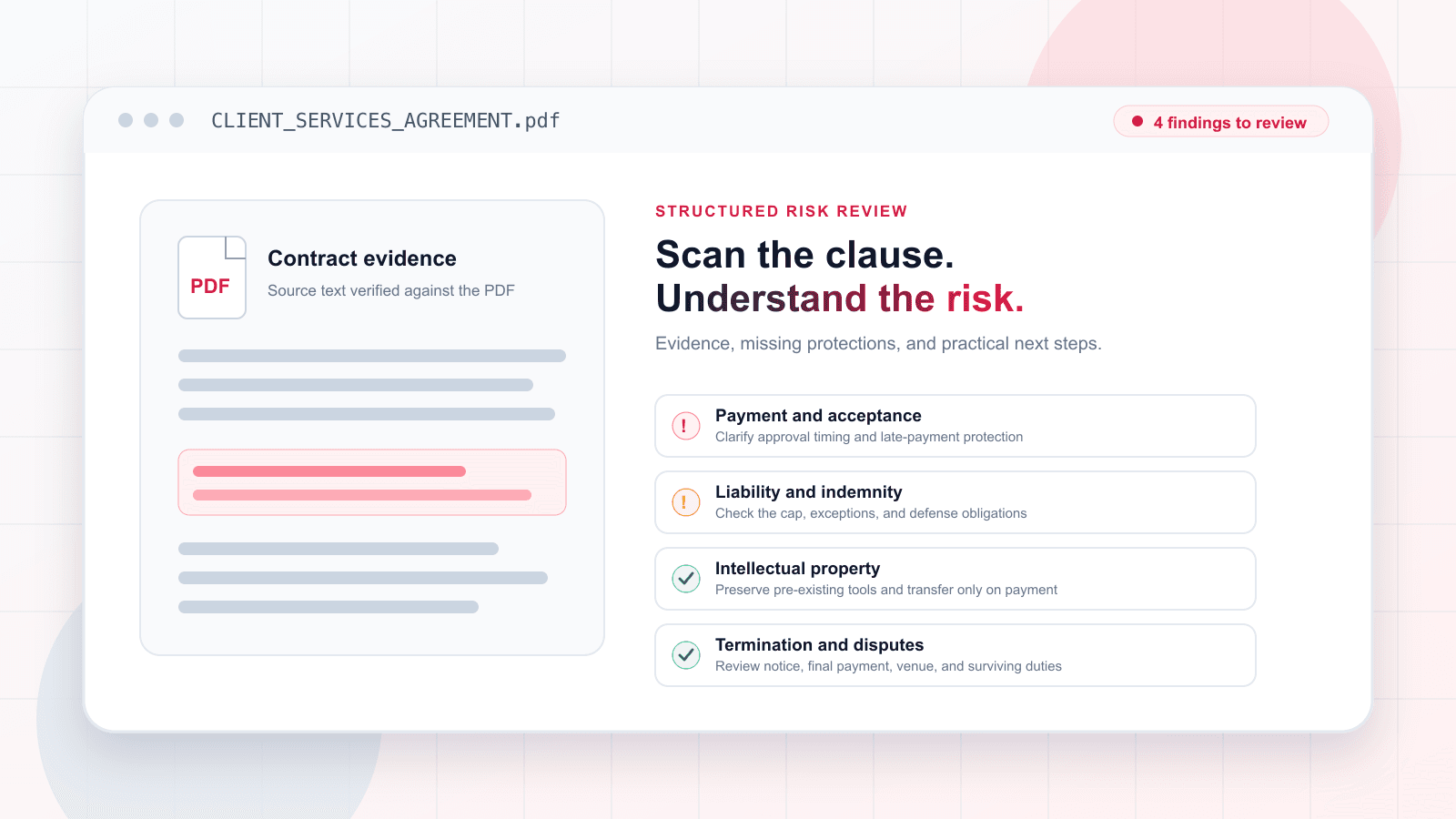
Yes - if the PDF contains readable text. A structured contract scanner can extract that text, classify the clauses, identify common risk patterns, and present the findings in a report. The useful part is not simply finding legal-sounding words. It is connecting the exact contract language to the practical risk it creates for the person who may sign it.
A first-pass scan should look for both problematic language and important protections that are missing. A contract can contain no obviously aggressive clause and still leave you exposed because it never defines payment timing, acceptance criteria, liability limits, ownership boundaries, or a workable exit route.
This kind of review is an issue-spotting tool, not legal advice. It can help you prepare questions, identify clauses that deserve negotiation, and decide whether the agreement should be escalated to a qualified lawyer.
Step 1: Check whether the PDF contains searchable text
Open the agreement and try to select a sentence or search for a word you can see on the page. If the text can be selected, copied, or found, the PDF probably contains a machine-readable text layer that a contract scanner can process.
If the document looks readable but no text can be selected, it may be an image-only scan. Adobe explains that scanned PDFs can contain only image data until optical character recognition (OCR) adds a searchable text layer. RedFlagged does not currently perform OCR. For an image-only document, run OCR first or paste verified text into the analyzer. Always compare important OCR output with the visible document because names, amounts, dates, and clause numbering can be misread.
Encrypted, damaged, unusually large, or poorly structured PDFs may also fail extraction. Do not treat a failed upload as evidence that the agreement is safe; switch to a readable source or request a clean copy from the counterparty.
Step 2: Add the contract context before scanning
The same clause can affect each party differently. Before analysis, specify the agreement type, which side you represent, the contract language, the requested report language, and the governing jurisdiction stated in the document. Language and governing law are separate: a German-language agreement can be governed by California law, while an English-language contract can be governed by German law.
If the agreement does not state governing law or venue, mark it as unknown instead of guessing. The absence of a jurisdiction clause may itself be a point to clarify, especially when the parties are in different countries or states.
- Choose the closest contract type, such as freelance, NDA, SaaS, employment, or consulting.
- Identify your side so the report evaluates the risk from your position.
- Select the jurisdiction only when the agreement states it or you know it independently.
- Use a clear filename and report title so the analysis is easy to find later.
Step 3: Scan seven areas that create the most practical risk
A useful PDF contract scan should cover the agreement as a system rather than searching for one alarming phrase. Start with these seven areas and trace how they interact.
- Payment and acceptance: amount, currency, due date, expenses, late payment, acceptance tests, and any right to withhold payment.
- Scope and change control: deliverables, dependencies, revision limits, deadlines, client responsibilities, and how additional work is approved and priced.
- Liability and indemnity: financial caps, excluded damages, defense obligations, third-party claims, and exceptions that quietly remove the cap.
- Intellectual property: what transfers, when ownership transfers, treatment of pre-existing tools, portfolio rights, licenses, and moral-rights language.
- Termination: notice periods, termination for convenience, cure periods, payment for completed work, and obligations that survive termination.
- Confidentiality and restrictions: definition, carve-outs, duration, return or deletion duties, non-solicit, non-compete, and publicity restrictions.
- Governing law and disputes: governing jurisdiction, venue, arbitration, fee shifting, notice mechanics, and whether enforcement is practical for you.
Step 4: Require evidence for every important finding
A risk label without source language is difficult to verify. For every significant finding, the report should show the exact contract excerpt and, where possible, the page on which it appears. This lets you compare the explanation with the agreement instead of trusting a detached summary.
RedFlagged verifies quoted evidence against the text extracted from the submitted document before displaying it as source-verified. When no reliable excerpt can be matched, the report should say so. Verification reduces unsupported citations, but it does not prove that the interpretation is legally correct or that every relevant clause was found.
Pay particular attention to defined terms and cross-references. A liability cap in one section can be weakened by an indemnity exception elsewhere, and an apparently balanced termination clause can depend on a notice procedure hidden near the end of the agreement.
Step 5: Turn findings into negotiation actions
The output should help you decide what to do next. Prioritize high-severity findings, then missing protections, then one-sided terms. Positive clauses still matter because they show which parts of the agreement already protect you and should not be traded away casually.
For each priority issue, write one plain question and one narrow proposed revision. A focused request - such as capping aggregate liability at fees paid under the agreement - is easier to discuss than a vague objection that the contract feels unfair.
- What is the worst realistic outcome if this clause is enforced as written?
- Is the risk capped, reciprocal, and connected to matters I can control?
- What protection is missing, and where should it be added?
- What exact sentence would make the obligation clearer or more balanced?
- Does the revision affect another definition, exception, or cross-reference?
Generic AI chat versus a structured contract scanner
A general AI chat can explain a clause or help brainstorm questions, but the quality of the review depends heavily on the prompt, the context supplied, and whether the model checks the entire agreement consistently. A purpose-built scanner adds a repeatable structure: contract context, defined risk categories, missing-protection checks, evidence verification, report validation, and export controls.
RedFlagged extracts text from the uploaded PDF on its server and sends the extracted text - not the original upload - to the OpenAI API to generate the analysis. The original uploaded file is not stored by RedFlagged. The generated report is saved to the account until the owner deletes it. OpenAI states that API data is not used to train or improve its models unless the customer explicitly opts in, while standard API abuse-monitoring retention can apply. Read the current privacy documentation before submitting confidential material.
Neither workflow replaces a lawyer. The advantage of a structured scanner is a more consistent first pass and a report that can be checked, exported, and used to prepare a focused conversation.
When should you stop and involve a lawyer?
Escalate when the possible loss is materially larger than the contract value, the legal effect depends on local law, or the agreement changes ownership, employment, regulatory, or personal rights that cannot easily be repaired later.
- The agreement includes a personal guarantee, uncapped liability, broad indemnity, or responsibility for another party's conduct.
- You are transferring core intellectual property, equity, source code, trademarks, data rights, or rights needed for future work.
- The contract contains a non-compete, exclusivity obligation, broad non-solicit, or restriction that may affect future income.
- The deal is cross-border, regulated, employment-related, or subject to an unfamiliar jurisdiction.
- The counterparty rejects reasonable clarification, pressures you to sign immediately, or presents inconsistent versions.
- A dispute already exists or you need advice protected by an attorney-client relationship.
Run a structured first-pass review
With RedFlagged, you can upload a readable PDF or paste the agreement text, select the relevant context, and receive a structured report covering red flags, missing protections, one-sided clauses, positive terms, jurisdiction, negotiation questions, and suggested revisions. Full reports can be exported as a designed PDF and an editable DOCX revision package.
Start with one lifetime preview and no credit card. If you need the complete report, a Single Review unlocks every finding and export for that saved analysis without an ongoing subscription. Review the evidence against the source document, resolve the priority issues, and involve qualified counsel whenever the consequences require jurisdiction-specific advice.
Frequently asked questions
Can software automatically identify contract red flags? It can identify common risk patterns and missing protections, but the output still needs human verification and does not replace legal advice.
Can a scanner read every PDF agreement? No. The file needs readable text. Image-only scans require OCR or pasted text, and encrypted or damaged files may fail extraction.
Can contract software detect non-standard language? It can flag language that appears one-sided, unusually broad, incomplete, or inconsistent with the selected context. Whether a term is legally enforceable depends on the agreement and jurisdiction.
Does a low-risk report mean the contract is safe? No. It means the scan found fewer or less severe issues under its review framework. You must still verify names, amounts, dates, obligations, attachments, and the commercial deal you intended.
Are uploaded PDFs stored? RedFlagged does not store the original uploaded file. It stores the generated report in the owner's account until deletion. See the privacy policy for current processing and retention details.
Sources and methodology
Product details were checked against RedFlagged's current analysis flow. External claims were reviewed against the primary sources below.
- Adobe Acrobat - Recognize text in scanned PDFs
How OCR adds selectable, searchable text to image-only PDF scans.
- OpenAI - Data controls in the OpenAI platform
Current API training and retention controls, including standard abuse-monitoring retention.
- RedFlagged Privacy Policy
How RedFlagged processes uploads, generated reports, account history, and deletion requests.